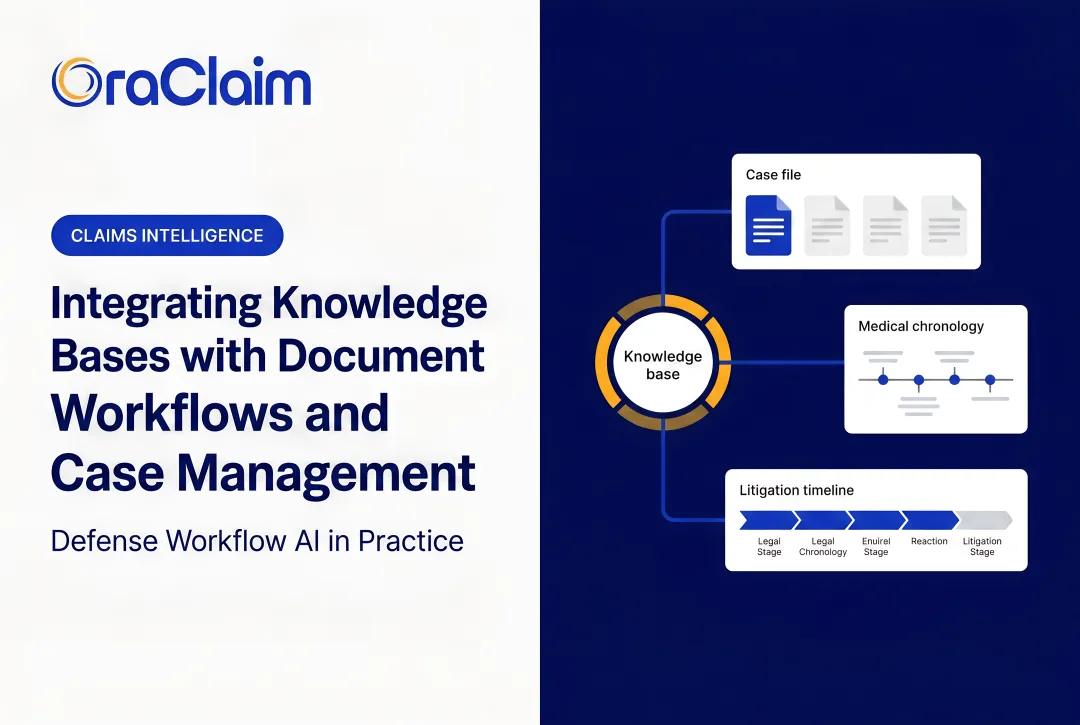
Integrating these systems sounds like a straightforward IT project. It rarely is. Two firms can follow identical steps and get completely different results, and the difference almost never comes down to the technology. It comes down to preparation, data quality, and whether anyone owns the integration after launch.
This article walks through the exact steps to connect your CRM with legal software, what needs to be in place before you start, and the variables that determine whether the integration delivers real efficiency gains or quietly becomes a liability.
Key Takeaways
- CRM-legal software integration eliminates duplicate data entry and creates a single source of truth across your tech stack.
- Success depends on data cleanup, clear goals, and choosing tools that support your existing systems without requiring custom development.
- ROI comes down to data mapping accuracy, security configuration, user adoption, and ongoing maintenance — the integration is just the starting point.
- Most failures trace back to skipped prep work, not technical limitations.
- Defense teams gain the most when CRM contact data flows in real time into case management, eliminating manual re-entry entirely.
How to Integrate Your CRM with Legal Software: Step-by-Step
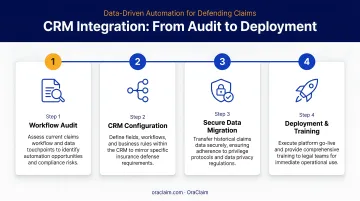
Step 1: Audit Your Current Systems and Define Integration Goals
Start with a full inventory of every tool in your stack — CRM, practice management platform, document management system, billing software — and document what data lives in each one and how it currently moves between them (manually, via export/import, or through existing connectors).
Then define what "integrated" actually means for your firm:
- Auto-populating a case record when a lead converts to a client?
- Syncing contact data bidirectionally between your CRM and matter system?
- Pushing claim status updates from your legal software back into the CRM?
Without specific goals, integration projects expand indefinitely. Identify the workflows creating the most friction right now — manual re-entry of contact information when a prospect becomes a client, or hunting across systems for the latest communication log on a claim — and treat those as your primary use cases.
Step 2: Evaluate Integration Compatibility
Determine whether your CRM and legal software support native (direct) integrations, API connections, or only third-party middleware like Zapier. Native integrations are typically more reliable and require less ongoing maintenance than middleware-dependent connections.
Before committing, check vendor documentation for the depth of the available connection:
- Does it support real-time two-way sync, or only scheduled one-way exports?
- Which specific fields and record types are covered?
- Does your subscription tier include API access? Many entry-level CRM tiers restrict or exclude API functionality entirely.
For defense and claims workflows where case status changes daily, real-time sync is strongly preferred over batch updates. Platforms that are already purpose-built to connect with practice management and document management systems — such as OraClaim, which supports integrations with Clio, MyCase, Smokeball, PracticePanther, NetDocuments, iManage, Worldox, and Box — eliminate the custom development that generic CRM-to-legal bridges typically require.
Step 3: Clean and Map Your Data Before Migration
Data quality determines whether an integration works in practice or just on paper. According to Salesforce, the average contact database is 90% incomplete, with 20% of records effectively useless.
Syncing a dirty CRM into your legal platform doesn't clean the data — it spreads the problem.
Before anything goes live:
- Remove duplicates — deduplicate contacts, matters, and claimant records in both systems
- Standardize naming conventions — decide whether the field is "client," "claimant," or "contact" and use it consistently
- Archive stale records — don't migrate data you no longer need
Then build a data mapping document:
- Which CRM contact fields correspond to matter parties in your case management system?
- What happens when a field exists in one system but not the other?
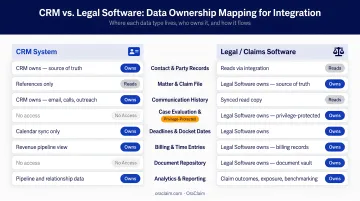
- Which system is the system of record for each data type? The CRM typically owns lead and contact data; legal software owns matter details, deadlines, and documents.
Conflicts in data authority are among the most common sources of sync errors post-integration. Resolving them on paper before go-live is far cheaper than reconciling them in production.
Step 4: Configure, Test, and Train Before Full Deployment
Never configure an integration directly in your production environment. Set up a sandbox or staging instance first, run test records through the full workflow. Verify that a lead created in your CRM populates correctly in the legal software as a new matter.
What to confirm before going live:
- All mapped fields sync to the correct destination
- Permission conflicts or missing-field errors surface in testing, not production
- Role-based access controls are configured, since not every CRM user needs write access to matter records, and vice versa
Once configuration is confirmed, run structured training for all staff on the new workflows — specifically what they no longer need to do manually. Feature overviews are not training. If attorneys and claims staff don't trust the sync, they'll keep entering data manually in both systems — and you'll be maintaining two sets of records instead of one.
What You Need Before You Integrate
Preparation quality is the single biggest predictor of integration success. Teams that skip straight to configuration almost always hit data conflicts, permission failures, or workflow gaps within the first 30–90 days.
System and Technical Requirements
Before starting:
- Confirm both platforms are on current, supported versions
- Verify your subscription tier includes API access in both systems
- Ensure your IT or legal ops team holds admin credentials for both platforms
Data Readiness
HubSpot data shows that contact databases naturally decay by 22.5% annually. That means a CRM that hasn't been actively maintained for two years may have nearly half its records outdated before a single sync runs. Data cleanup is a prerequisite, not a post-launch task.
Compliance and Confidentiality Readiness
Legal and insurance defense data carries specific obligations. ABA Model Rule 1.6(c) requires lawyers to make reasonable efforts to prevent inadvertent or unauthorized disclosure of client information — and that obligation extends to every system the data passes through.
Before configuring any integration:
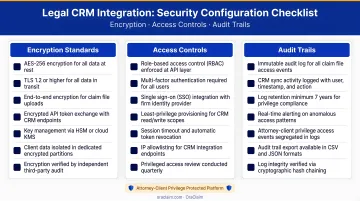
- Confirm data transmitted between systems is encrypted in transit and at rest
- Verify audit logs capture all data movement involving client or claimant records
- Check that the integration method has been reviewed against applicable bar association guidelines and, for insurance operations, the NAIC Insurance Data Security Model Law (adopted October 2017 and implemented across numerous states)
The architecture of any platform you integrate should reflect these requirements. OraClaim, for example, operates as a closed, access-restricted environment where third-party sub-processors are contractually prohibited from accessing confidential information for anything beyond transient processing. That structure is what allows privilege protection to hold across integrated systems, not just within a single tool.
Key Variables That Affect Integration Success
Two firms can follow identical integration steps and get very different results. The difference almost always comes down to how well they controlled these four variables.
Data Mapping Accuracy
Poor mapping means records either fail to sync, land in the wrong field, or create duplicate entries. These errors compound over time and erode trust in both systems — eventually forcing staff to manually reconcile records, which eliminates the efficiency gains the integration was built for.
Before go-live, have both a CRM admin and a legal software admin review the mapping document together — not separately.
Security and Compliance Configuration
Legal and claims data is among the most sensitive category of business data. A misconfigured integration can expose confidential records to unauthorized users or create data residency issues that violate state bar guidelines or insurance regulatory requirements.
Security configuration — encryption, role-based access, audit trails — should be established at setup, not retrofitted after the fact. Platforms purpose-built for legal work apply these controls at the integration layer, sparing defense teams from building compliance infrastructure from scratch.
User Adoption Rate
Nucleus Research found that CRM investments return $3.10 per dollar spent across 63 case studies — but that return depends entirely on staff actually using the connected workflows. If attorneys or claims staff continue entering data manually because they distrust the sync, the integration delivers no ROI and both systems fall out of sync.
Adoption failure is the most common reason integrations underperform. Technical configuration is the easier half of deployment.
Ongoing Maintenance and Monitoring
API connections break when platforms release updates, and field mappings fall out of alignment whenever a new field is added to one system but not reflected in the integration configuration.
Without a designated owner monitoring sync health, errors accumulate silently for months. Establish a monthly cadence for:
- Reviewing integration logs and sync error reports
- Spot-checking a sample of records across both systems
- Updating field mappings when either platform changes its schema
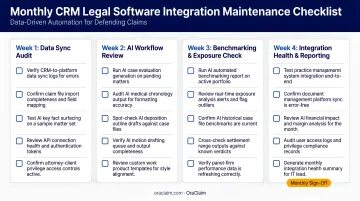
Teams that treat integration as a one-time project almost always skip this step.
Common Mistakes When Integrating CRM with Legal Software
Most integration failures trace back to the same handful of avoidable errors:
Skipping data cleanup before connecting systems. Duplicate, incomplete, and inconsistently formatted records sync straight into the legal platform. Cleaning up data quality post-integration is significantly harder — and more disruptive — than doing it beforehand.
Treating integration as a one-time setup. Every integration needs an assigned owner, a monitoring cadence, and a defined process for handling sync failures. Without that ownership, connections silently degrade until attorneys and adjusters stop trusting what they see.
Assuming default security settings satisfy legal compliance obligations. Default CRM configurations rarely account for bar association rules or NAIC data protection requirements. Jurisdiction-specific obligations vary — and getting this wrong can trigger bar complaints, regulatory audits, or data breach liability.
Choosing tools without verifying integration depth. Two platforms that both "offer integrations" may only support a shallow, one-way data push. Discovering post-purchase that your connection doesn't support bidirectional, real-time sync is an expensive problem to fix.
Conclusion
CRM-legal software integration eliminates manual re-entry, syncs claim and contact data without human intervention, and gives defense teams a unified view across every matter. It only delivers those gains when built on clean data, properly configured security, and a realistic adoption plan.
Most integration failures trace back to skipped preparation steps or underestimated maintenance requirements — not the technology itself. Defense firms and claims organizations that invest in the groundwork upfront tend to reach a stable, productive integration faster and with fewer costly rollbacks. The framework covered here addresses those failure points directly, so your team can move from configuration to consistent, day-to-day use without losing momentum.
Frequently Asked Questions
What are the 4 types of CRM?
The four main types are operational (automates sales, marketing, and service workflows), analytical (focuses on data analysis and reporting), collaborative (facilitates cross-department information sharing), and strategic (long-term relationship and client intelligence focused). For law firms and claims organizations, operational and analytical CRMs are most relevant — operational for managing intake and contact workflows, analytical for tracking matter outcomes and client patterns.
What is the difference between a CRM and legal practice management software?
A CRM manages lead, prospect, and contact relationships — tracking communications and pipeline. Legal practice management software manages active matters, deadlines, billing, and documents. The two are complementary: integration lets client data flow from intake through the full matter lifecycle without manual re-entry at each transition point.
How long does it take to integrate a CRM with legal software?
Timelines vary based on data volume, complexity, and integration method. A native connector between well-maintained systems with clean data can be configured in days; a custom API build with significant legacy data cleanup may take weeks or months.
What data should be synced between a CRM and legal software?
Core sync categories include:
- Contact and claimant records
- Matter or case assignments linked to those contacts
- Communication logs
- Document status
- Pipeline or intake stage
Sync what your workflows actually require — over-syncing introduces unnecessary compliance risk.
How do you ensure client data security when integrating CRM with legal software?
Confirm that data is encrypted in transit and at rest, that the integration logs all data movement, and that role-based access controls are configured in both platforms. For insurance operations, verify compliance with applicable bar ethics opinions, NAIC Model Law #668, and any state-specific implementations.