Clio has become a foundational tool for managing cases, clients, and billing. But its true power isn't just in what it does on its own—it's in how it connects with specialized software. The most effective firms build a powerful tech stack around Clio, using integrations to automate critical workflows. This article will guide you through the best software integrations for Clio, focusing on tools that enhance case management, boost efficiency, and help you deliver better outcomes.
Key Takeaways
- Clio is a leading legal practice management software, but integrations are key to creating a comprehensive, automated workflow.
- Top integrations enhance specific areas like client intake (Lawmatics), document analysis (OraClaim), and litigation tasks (InfoTrack).
- For defense firms, AI-powered tools like OraClaim are critical for analyzing large volumes of documents and leveling the playing field against tech-savvy plaintiff firms.
- When choosing, prioritize the depth of the integration, the specific problem it solves, and its relevance to your practice area.
Why Integrate Case Management Tools with Clio?
While Clio is an excellent "single source of truth" for your case files and client data, no single platform can excel at every specialized legal task. This is where a legal tech stack comes in. By building a suite of best-in-class tools around Clio, you can create a seamless, automated system where each component handles a specific function—like CRM, eFiling, or AI analysis—and feeds data back to your central record.
Think of Clio as the hub of a wheel. Integrations are the spokes that connect it to specialized functions, making the entire operation stronger and more efficient. According to a Clio Legal Trends Report, growing law firms use time-saving automations twice as much as stable firms, highlighting the direct link between technology and growth.
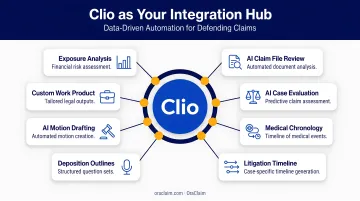
Key benefits of integration include:
- Eliminate Duplicate Data Entry: Automatically sync client information, case details, and documents between systems to reduce administrative errors.
- Automate Repetitive Tasks: Free up billable hours by letting software handle tasks like appointment reminders, document filing, and expense tracking.
- Gain Deeper Case Insights: Connect different systems to analyze data from multiple angles, uncovering patterns and strategies you might otherwise miss.
- Create a Seamless Workflow: Build a smooth process that carries you from initial client intake all the way to case resolution without manual handoffs.
5 Best Legal Software Tools with Clio Integration
The following tools were selected for their deep integration with Clio and their ability to solve critical challenges in the legal case management lifecycle. Each one extends Clio's core functionality in a meaningful way.
Lawmatics: For Advanced Client Intake & Marketing Automation
Lawmatics is a legal-specific CRM that automates the entire client journey, from the first point of contact to conversion. It bridges the gap between your marketing efforts and case management, ensuring a smooth handoff of new clients into Clio without tedious manual data entry.
| Key Feature | Description |
|---|---|
| Automated Workflows | Create custom intake forms, schedule appointments, and send automated email campaigns to nurture leads and onboard new clients. |
| Seamless Clio Sync | Automatically creates contacts and matters in Clio when a lead is converted, syncing all relevant notes and custom fields. |
| Robust Reporting | Track marketing ROI and intake pipeline performance to make data-driven decisions about your firm's growth. |
OraClaim: For AI-Powered Document Review & Case Strategy (Defense Focus)
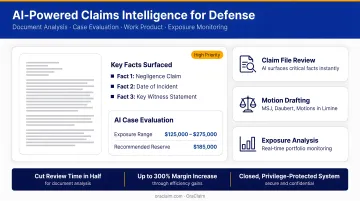
For insurance defense lawyers and claims professionals, the biggest bottleneck is often reviewing thousands of pages of unstructured data. OraClaim is an AI-powered platform purpose-built to solve this problem by automating the analysis of medical records, discovery documents, and claim files.
It helps level the playing field against tech-savvy plaintiff firms by giving defense teams tools to match their pace. The platform can cut document review time in half, generate litigation-ready work product, and benchmark cases against historical data to refine strategy.
| Key Feature | Description |
|---|---|
| Proprietary AI Analysis | Instantly structures and summarizes case documents, generating medical chronologies and case evaluations to cut review time in half. |
| Strategic Insights | Benchmarks past cases by jurisdiction, plaintiff counsel, and judge to identify patterns, anticipate outcomes, and build data-driven defense strategies. |
| Seamless Integration | Connects with practice management systems like Clio to analyze documents stored within matters, enhancing your existing workflow. |
NetDocuments: For Enterprise-Level Document & Email Management
NetDocuments is a cloud-based document management system (DMS) designed for the security and compliance needs of modern law firms. While Clio has its own document storage, NetDocuments provides an enterprise-grade solution with advanced version control, ethical walls, and powerful search capabilities for firms with complex document security requirements.
| Key Feature | Description |
|---|---|
| Centralized Cloud Storage | Organizes all documents and emails related to a Clio matter in a single, secure, and easily searchable repository. |
| Version Control | Tracks changes, manages drafts, and prevents accidental overwrites of critical legal documents, ensuring you always work from the correct version. |
| Advanced Security | Offers granular access controls, data encryption, and compliance features like ethical walls to protect sensitive client information. |
Casetext: For AI-Assisted Legal Research
Casetext (now part of Thomson Reuters CoCounsel) is a modern legal research platform that uses AI to help lawyers find relevant authorities faster. Its integration with Clio streamlines the research process by connecting it directly to your case files.
You can upload a brief or motion directly from a Clio matter, and Casetext's AI, CARA, will analyze the text to find relevant—and sometimes overlooked—case law. This saves you from manually constructing complex search queries and ensures your research is directly tied to the facts of your case.
| Key Feature | Description |
|---|---|
| CARA A.I. Search | Analyzes legal documents to find on-point cases based on the facts and legal issues of your specific matter. |
| Direct Clio Workflow | Send documents from a Clio matter to Casetext with a single click, keeping all case-related work organized and efficient. |
| Case Summaries & Flags | Quickly understand case holdings and see clear flags for bad law, accelerating the research and citation process. |
InfoTrack: For Automated Court Filing & Litigation Tasks
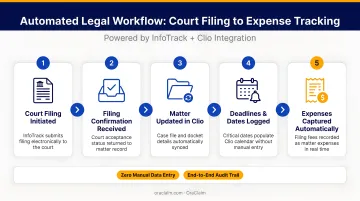
InfoTrack streamlines the administrative side of litigation by automating tasks like eFiling, process serving, and eSignatures. Its key advantage is that it eliminates the need to leave the Clio interface to file documents with the court.
The integration automatically pulls case information from the relevant Clio matter to pre-fill court forms, which InfoTrack claims populates over 95% of fields automatically. This not only saves significant time but also dramatically reduces the risk of manual data entry errors.
| Key Feature | Description |
|---|---|
| One-Click eFiling | Submit documents for electronic court filing directly from the corresponding matter in Clio. |
| Automatic Expense Tracking | Filing fees and service costs are automatically recorded back to the correct Clio matter for easy and accurate client billing. |
| Document Sync | Court-stamped documents and proofs of service are automatically saved back into the appropriate Clio matter folder. |
How We Chose the Best Software for Clio Integration
Our evaluation focused on tools that provide tangible value and seamlessly extend Clio's core case management functionality. We didn't just look for a logo in Clio's App Directory; we prioritized software that makes a real difference in a firm's day-to-day operations.
Our key selection criteria included:
- Prioritizing deep, two-way syncs that allow you to trigger actions directly from the Clio interface, creating a more unified workflow.
- Solving a major pain point in the case management lifecycle, from client intake and document analysis to court filing and legal research.
- Earning consistently positive feedback from active Clio users and maintaining a strong reputation in the legal tech community.
Conclusion
The most effective law firms don't rely on a single piece of software to do everything. They build a customized tech stack with a powerful platform like Clio at its center, surrounded by specialized tools that automate and enhance every part of their workflow.
The "best" integration ultimately depends on your firm's specific needs. While nearly any firm can benefit from streamlined client intake, a defense-focused practice gains a significant competitive edge with AI-powered analysis tools that can tackle complex document review. By choosing the right integrations, you can transform Clio from a record-keeping system into a dynamic engine for growth and efficiency.
For defense lawyers and claims professionals looking to cut document review time and build stronger, data-driven case strategies, discover how the OraClaim AI platform integrates with Clio to drive efficiency and better outcomes.
Frequently Asked Questions
What is Clio software used for?
Clio is a cloud-based legal practice management software used by law firms to manage their cases, clients, documents, billing, and timekeeping in one central platform. It acts as the operational hub for a legal practice.
Is Clio a CMS?
Yes. In the legal world, CMS stands for "Case Management System," and Clio is a leading example. It helps firms organize and manage all information related to their legal matters.
What is the difference between an integration and a standalone software?
Standalone software works independently to perform a specific function. An integration is a connection that allows two separate software systems (like Clio and OraClaim) to share data and work together automatically, creating a more efficient process.
How do integrations improve law firm efficiency?
Integrations reduce manual data entry and automate repetitive tasks, which saves significant time and minimizes human error. This creates a single source of truth for case information, freeing up lawyers to focus on billable work.
What are the benefits of integrating AI tools like OraClaim with Clio?
Integrating an AI tool like OraClaim with Clio automates complex analytical tasks. It allows defense teams to instantly analyze case documents, generate litigation-ready work product, and uncover insights that help predict outcomes.
How do I find integrations in the Clio App Directory?
Visit the official Clio App Directory to search for over 250 integrations by category or function. The directory provides instructions on how to connect them to your Clio account.