The stakes are real. According to the ABA's 2024 AI TechReport, 74.7% of attorneys cite accuracy concerns and 47.2% flag data privacy and security as primary AI worries—concerns that proper integration planning directly addresses. Meanwhile, plaintiff firms are already embedding AI into their litigation workflows, and defense teams that delay or botch their integration fall further behind.
Most failures aren't caused by choosing the wrong AI tool. They're caused by inadequate readiness work—unstructured data, skipped security reviews, and attorneys who never trusted the system enough to use it consistently.
This guide walks defense lawyers and claims professionals through the complete integration process: from readiness assessment to post-deployment validation.
Key Takeaways
- AI case management integration is a multi-phase process spanning data, systems, and compliance — not a one-step install
- Map workflows, audit system compatibility, and confirm data governance standards before connecting any AI tool
- Integration follows six phases: readiness audit → tool selection → system connection → data migration → attorney training → full deployment
- Top failure points: poor data prep, selecting a general-purpose AI not built for defense workflows, and under-trained attorneys at go-live
- Post-integration validation — testing outputs against known cases and confirming source traceability — is what makes integrations stick
The Full Integration Process: What Defense Firms Need to Know
Most firms treat AI integration like a software subscription—sign up, log in, start using it. That approach consistently fails.
A complete integration for a defense law firm or claims organization typically takes four to twelve weeks from decision to live deployment, depending on data volume, system complexity, and firm size.
The process involves at minimum three stakeholder groups: legal operations or a tech-forward attorney, IT (internal or vendor-provided), and the AI vendor's onboarding team.
The Integration Sequence
- Readiness audit — map workflows, assess data quality, confirm compliance requirements
- Tool selection and compatibility review — verify the AI works with your existing platforms
- System connection and data migration — connect to practice management and document management systems; migrate historical files
- Configuration and pilot testing — test on a defined, high-volume matter type before broad rollout
- Attorney training — role-specific sessions focused on tasks attorneys actually perform
- Full deployment and validation — verify outputs, confirm source traceability, measure against baseline
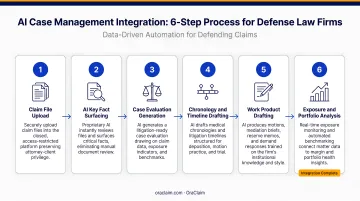
Skipping or compressing steps two through four is the leading cause of failed integrations. Data migration and pilot testing are where firms cut corners most often — and where those shortcuts cause the most damage downstream.
Prerequisites and Readiness Checks
Before any technical work begins, three prerequisites must be confirmed: a clear picture of how cases move from intake to resolution, a designated internal lead who owns the integration process, and documented data governance standards.
These aren't procedural formalities. For insurance defense workflows, skipping any one of them creates downstream compliance exposure that's harder to fix after the AI is already connected to live case files.
Security and Compliance Requirements
Connecting AI to case files creates immediate ethics obligations under ABA Formal Opinion 512, which requires lawyers using AI to fully consider competence, confidentiality, supervisory responsibilities, and candor obligations. Before any integration proceeds, confirm:
- Attorney-client privilege protection is contractually preserved (the AI vendor must not use firm data to train external models)
- Data is encrypted at rest and in transit
- Role-based access controls are configured before go-live
- The firm has a documented data governance policy
OraClaim, for example, operates as a closed, access-restricted system where firm data cannot be used to train or improve any external AI models—a non-negotiable requirement for defense workflows.
Data Readiness
AI tools are only as effective as the data fed into them. If case files are inconsistently named, stored across disconnected platforms, or consist of scanned PDFs without OCR processing, the AI will underperform regardless of how well the integration is technically configured.
Data readiness checklist:
- File naming conventions standardized across matters
- Documents stored in accessible, structured repositories (not scattered across email threads and local drives)
- Scanned documents processed through OCR before migration
- Historical closed-case files identified and available for ingestion
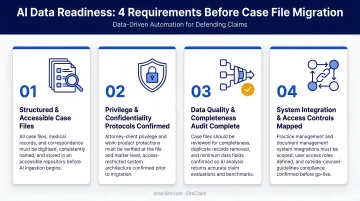
Data cleanup must happen before migration. Once the AI begins ingesting files, remediation requires re-processing — adding time and cost that compounds quickly across a large matter inventory.
Non-Negotiables: When to Pause
With data readiness confirmed, the final checkpoint is a go/no-go decision. Do not proceed with integration if:
- No confirmed data governance policy exists
- No IT or vendor security review has been completed
- There is no attorney oversight plan for AI outputs
- The selected AI draws on external web sources rather than the firm's own case data
Systems and Access Required
Essential before go-live:
- Access credentials and API documentation for the firm's existing practice management platform
- A connected document management system or structured file repository
- Defined user roles and permission levels mapped to actual job functions
- The AI vendor's integration guides for each connected system
Phase in after core integration stabilizes:
- Advanced workflow automation
- Custom reporting dashboards
- Claims portfolio analytics and benchmarking configuration
Once those requirements are in hand, firms operating across separate claims management, billing, and document systems need to map each connection point before technical work begins. Each system represents a separate API dependency with its own update and versioning considerations, and that's where integration complexity compounds quickly.
Purpose-built platforms cut down on these compatibility issues. OraClaim integrates natively with Clio, MyCase, Smokeball, and PracticePanther for practice management, and with NetDocuments, iManage, Worldox, and Box for document management, all upon customer request and without requiring firms to overhaul their existing technology stack.
How to Integrate AI Case Management Software: Step-by-Step
Integration succeeds when it follows a defined sequence. Compressing or reordering steps — particularly data migration and pilot testing — creates problems that are difficult and expensive to unwind.
Step 1: Audit and Map Existing Workflows
Document how cases move from intake through resolution. Identify where attorney time is lost to manual document review, status tracking, or administrative data entry. Note which systems and file types must connect to the AI tool.
This audit also surfaces integration risks early. Common failure points include:
- Disconnected systems with no existing API pathway
- Inconsistent file formats across practice groups
- Workflow steps that rely entirely on manual handoffs
Identifying these before configuration begins keeps the integration on schedule.
Step 2: Configure the AI to the Firm's Data Environment
Connect the AI to the document management system and practice management platform via integrations or APIs. Restrict the AI's data access to the firm's internal case files only — this is non-negotiable. An AI that can draw on external web sources introduces two compounding risks: hallucinations and privilege exposure.
Stanford HAI research found that legal AI models hallucinate in 1 out of 6 or more benchmarking queries. The primary cause in defense workflows is AI accessing data outside the firm's controlled environment.
Step 3: Migrate and Structure Historical Case Data
Import prior case files in formats the AI can index. Standardize metadata and file naming conventions so the AI can benchmark outcomes across past claims and surface meaningful predictive insights.
This step determines whether analytics and outcome benchmarking will function correctly. Without structured historical data, the AI has no baseline to work from.
OraClaim's historical case file structuring module, for example, ingests years of unstructured PDFs, scanned files, email archives, and old practice management exports. It automatically classifies each file and extracts case type, jurisdiction, judge, plaintiff counsel, settlement amounts, verdict data, and defense costs by phase.
With that foundation in place, the pilot phase can run against a meaningful data set.
Step 4: Run a Controlled Pilot on a Defined Matter Type
Before full rollout, test the integration on a specific matter type the firm handles in volume: insurance defense claims, workers' compensation matters, or auto liability files. Track:
- AI output accuracy against manually reviewed cases
- Attorney adoption rate during the pilot period
- Time spent on document review vs. the pre-integration baseline
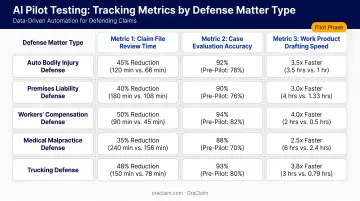
A structured pilot prevents a bad early experience from derailing firm-wide adoption.
Step 5: Train Attorneys and Staff, Then Deploy
Run role-specific training sessions focused on the actual tasks each role performs daily, not a generic software demo. Managing partners need different training than trial counsel; claims adjusters need different guidance than senior associates.
Follow up the initial workshop with Q&A sessions after attorneys have used the system on real cases. Document firm-specific prompts and workflows so usage is consistent across the team.
Post-Integration Checks and Validation
Functional Testing Requirements
Before declaring the integration live, run these checks:
- Source traceability: every AI output must include a citation back to the source document — attorneys must be able to verify every AI summary against the source document
- Known-case testing: run AI document review on matters where the correct output is already known and compare results
- Deadline extraction accuracy: verify against manually reviewed calendars
- Workflow trigger testing: confirm task creation, status updates, and alerts are firing correctly across connected platforms
OraClaim surfaces pin-citations to underlying record pages in all work product types—medical chronologies, litigation timelines, deposition outlines, and case evaluations—so attorneys can verify every extracted fact against the original document before relying on it.
What Correct vs. Incorrect Integration Looks Like
| Correctly Integrated AI | Incorrectly Integrated AI |
|---|---|
| Outputs appear within the firm's existing environment | Requires copy-pasting between tools |
| Every output cites a traceable source document | Summaries cannot be verified against the record |
| Workflow triggers fire automatically | Status updates require manual entry |
| Attorneys can verify outputs without leaving the platform | Outputs contradict or don't match the actual case record |
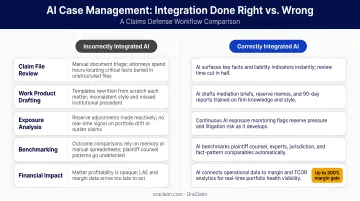
Why Skipping Validation Creates Delayed Failures
A single unverifiable AI output early in deployment can erode attorney trust fast. Once attorneys conclude the AI produces unreliable results, they revert to manual workflows — and regaining that confidence costs significantly more time and effort than the validation protocol itself. Run known-case tests before go-live, and schedule a structured review at the 30-day mark to catch drift before it hardens into skepticism.
Common AI Case Management Integration Problems and Fixes
Most integration failures fall into a predictable set of categories — and each has a workable fix. Here are the three most common problems defense firms encounter after go-live.
Issue 1: AI Outputs Are Inaccurate or Generating Hallucinations
The AI is producing summaries or case details that contradict source documents or reference non-existent facts. This typically means the system is pulling from outside the firm's restricted data environment, or that claim documents were migrated as scanned PDFs without OCR processing — leaving the AI to work with unreadable files.
Fix:
- Reconfigure data source settings to restrict access to the firm's connected repository only
- Reprocess unreadable documents through OCR before re-ingesting
- Re-run the validation protocol against known cases before re-launching to the broader attorney team
Issue 2: Attorneys Are Not Using the System After Launch
Attorneys are reverting to pre-integration manual workflows despite the AI being technically live. In most cases, the tool wasn't tested on the firm's actual case types before rollout, outputs can't be quickly verified, or training skipped the specific daily tasks attorneys actually care about.
Fix:
- Implement a structured feedback mechanism for attorneys to flag questionable outputs
- Run targeted demos using real defense matters from the firm's active docket
- Provide role-specific use case guides mapping AI capabilities to document review, chronology, and reporting tasks
Issue 3: Integration Breaks After a System Update
Following an update to the firm's practice management platform or document repository, the AI integration stops functioning or produces inaccurate or incomplete results. The root cause is almost always unversioned API dependencies — the AI vendor wasn't notified of the planned change before it went live.
Fix:
- Establish a change management protocol requiring vendor notification before any update to connected systems
- Confirm whether the integration supports automatic versioning or requires manual reconfiguration
- Document this protocol in the firm's IT governance records
Pro Tips for Effective AI Case Management Integration
Start the pilot with high-volume, standardized matter types. Defense teams handling large volumes of similar claims—insurance defense, workers' compensation, auto liability—see the fastest ROI because the AI can pattern-match across a consistent dataset. Quick wins here build attorney confidence before expanding to complex litigation.
Treat data preparation as a dedicated phase. AI output quality depends directly on the structure and completeness of your historical data. Budget time for standardization before integration begins and assign a named owner to data cleanup.
Document every integration decision for ethics compliance. Keep a log of configuration choices, data migration steps, and training records — this audit trail demonstrates competent technology use under ABA Model Rule 1.1 and protects the firm if decisions are later challenged.
Know when to bring in a specialist. When integration spans disconnected systems — claims management, document management, and billing platforms — engage the vendor's implementation team rather than going full DIY. Specialist support upfront costs far less than re-implementing after a failed launch.
Conclusion
Integration quality determines whether AI case management software delivers measurable value or gets abandoned after six weeks. A well-planned integration can cut document review time in half, scale claim-handling capacity without adding headcount, and sharpen the competitive edge defense teams need against plaintiff firms that have been leveraging technology for years.
Thomson Reuters projects that AI could free legal professionals 12 hours per week within five years—but only for teams that integrate the technology correctly.
Treat AI case management integration as a strategic investment. That means disciplined preparation upfront, structured execution through go-live, and consistent validation against real claims outcomes. Defense firms and carriers that put in that work now will be handling more matters, at better margins, with the same team.
Frequently Asked Questions
How is AI used in case management?
AI in case management automates document review, extracts critical facts and deadlines from case files, and benchmarks matters against historical data to surface outcome patterns. Defense-focused platforms like OraClaim go further, generating litigation-ready work product (medical chronologies, deposition outlines, case evaluations, motion drafts) and freeing attorneys from repetitive administrative tasks.
What software do law firms use for case management?
Common practice management platforms include Clio, MyCase, Smokeball, and PracticePanther. Defense firms and claims organizations increasingly layer purpose-built AI solutions on top of these systems—tools specifically designed for high-volume defense workflows, claims benchmarking, and integration with carrier and TPA environments.
How long does it take to integrate AI case management software?
For most defense law firms, full integration from decision to live deployment takes four to twelve weeks. Firms with well-organized case data and clear IT infrastructure move faster. Data readiness is the most common factor that extends the timeline.
Is AI case management software secure enough for attorney-client privileged data?
Leading platforms restrict AI access to the firm's internal data only, use encryption at rest and in transit, and apply role-based access controls. Confirm the vendor contractually prohibits using firm data to train external AI models. OraClaim, for example, expressly prohibits this and is designed as a closed, access-restricted system.
Can AI case management software connect with existing document management systems?
OraClaim integrates with NetDocuments, iManage, Worldox, and Box for document management, and Clio, MyCase, Smokeball, and PracticePanther for practice management. Firms connect via APIs or native connectors without changing their existing technology stack.
What ROI can defense lawyers expect from integrating AI into case management?
ROI shows up as reduced document review time, increased matter capacity without added headcount, and better visibility into case outcomes. Thomson Reuters projects AI could free professionals up to 12 hours per week within five years, translating to meaningful billable capacity gains for defense teams on high-volume dockets.