Introduction
Defense lawyers and claims professionals face a pressure that plaintiff firms largely don't: producing precise, court-ready motions and briefs at volume, under constant deadline pressure, while managing carrier reporting requirements on top of everything else.
According to Thomson Reuters, attorneys spend 40% to 60% of their time drafting legal documents and reviewing contracts — with finding a suitable starting point for a new draft alone consuming more than 15 minutes per matter.
AI is narrowing that gap. Legal teams that adopt the right platforms are:
- Cutting non-billable drafting hours
- Surfacing case-critical facts faster
- Producing more consistent work product at volume
Plaintiff firms moved on this earlier. Defense teams that haven't are already working at a disadvantage.
This guide covers the best AI tools for drafting legal motions and briefs, what separates effective legal-specific tools from general-purpose ones, and how defense-focused professionals can choose the right platform for their workflow.
Key Takeaways
- AI brief-writing tools can cut drafting time from 20–120 hours per motion to a fraction of that, letting attorneys focus on strategy instead of formatting.
- Legal-specific tools outperform ChatGPT for court filings by reducing citation hallucination and applying proper jurisdictional structure.
- Defense teams should prioritize security (SOC 2, zero-data-retention), practice management integration, and litigation-context awareness.
- OraClaim is purpose-built for insurance defense — surfacing critical facts, benchmarking prior outcomes, and producing litigation-ready work product that general tools aren't built to deliver.
- Attorney review before filing is required — these are drafting tools, not final approvers.
What Makes AI Tools Effective for Drafting Motions and Briefs
Effective AI brief-writing tools do more than generate text. They understand legal structure, apply court formatting standards, and handle jurisdictional nuances that generic models miss entirely.
The Capabilities That Actually Matter
Defense teams evaluating AI drafting tools should screen for four things:
- Citation accuracy and hallucination prevention — the tool must verify citations against real case law, not generate plausible-sounding references that don't exist in any reporter
- Litigation-document specificity — can it handle motions in limine, responses to MSJs, Daubert motions, and discovery disputes — not just generic contracts?
- Data security — SOC 2 compliance, zero-data-retention policies, and attorney-client privilege protection are baseline requirements
- Integration capability — the tool needs to fit into existing practice management or document management workflows, not create a parallel system
Why General-Purpose AI Is a Liability for Court Filings
In June 2023, Judge P. Kevin Castel sanctioned attorneys Steven A. Schwartz and Peter LoDuca — along with their firm — $5,000 for filing a ChatGPT-generated brief containing fabricated case citations, including citations to cases that don't exist. The Mata v. Avianca case remains the most cited example of what happens when general-purpose AI meets court filings.
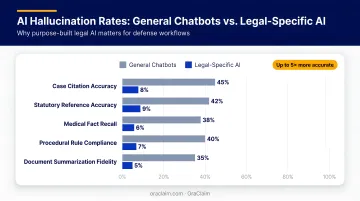
The risk isn't isolated. Stanford HAI research found that general-purpose chatbots hallucinate on legal queries at rates of 58% to 82%. Even purpose-built legal AI research tools hallucinated on 17% to 33% of legal queries in a 2025 Stanford study. That's why citation verification remains a mandatory step regardless of which tool generates the draft.
Best AI Tools for Drafting Legal Motions and Briefs
These tools were selected based on litigation-document specificity, citation reliability, security standards, and fit for defense-side workflows — not just general legal writing capability.
OraClaim
OraClaim is an AI-powered platform purpose-built for defense lawyers and claims professionals and the only tool on this list designed specifically for the defense side of the docket.
Co-founders Mark Tepper and Andy Anderson built it from lived experience: Mark litigated claims and managed risk for enterprise companies and insurers; Andy analyzed risk for insurers and managed high-exposure claims.
Both observed the same structural problem: plaintiff firms were adopting AI faster while defense teams were buried in manual document review, consuming 40–70% of associate hours per matter on non-billable work.
What OraClaim does for motion drafting specifically:
The platform's AI Motion Drafting module generates court-ready first drafts tailored to firm-specific style, jurisdiction-specific procedural rules, and case-specific record citations. Supported motion types include:
- Dispositive motions (MSJ, motion to dismiss, directed verdict, JNOV)
- Discovery motions (motions to compel, protective orders, motions to quash)
- Evidentiary motions (motions in limine, Daubert/Frye, bifurcation)
- Procedural and post-trial motions
Each draft includes a statement of facts with pin-citations to underlying records and depositions, applicable case law, argument section, prayer for relief, and proposed order , all matched to the firm's brief bank, Bluebook or state-specific citation style, and standard captions. The platform reduces dispositive motion drafting time from 20–120 billable hours per motion to hours for a first draft.
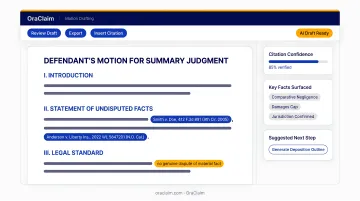
Beyond drafting, OraClaim's historical benchmarking module structures closed-case files into searchable institutional knowledge, surfacing judge-specific motion-grant rates, plaintiff-counsel outcomes, comparable verdict and settlement ranges, and plaintiff-expert bias patterns — context no general-purpose tool provides.
| Category | Details |
|---|---|
| Key Features | Litigation-ready motion drafting with pin-citations; AI claim file review and critical-fact surfacing; historical case benchmarking; real-time exposure analysis; custom work product drafting trained on firm style |
| Best For | Defense lawyers, insurance carriers, TPAs, and claims organizations managing high-volume defense litigation |
| Security | Industry-standard encryption, authentication, and data protection; closed access-restricted system preserving attorney-client privilege and work-product doctrine; no AI model training on client data |
CoCounsel (Casetext / Thomson Reuters)
CoCounsel is a litigation-focused AI assistant built on GPT-4, acquired by Thomson Reuters in August 2023 for $650 million. It drafts motions, responses, and pleadings from attorney-provided instructions while grounding research in Westlaw and Practical Law content.
For litigators who want fast first drafts connected to verified Thomson Reuters legal data, it's one of the strongest general litigation AI tools available.
| Category | Details |
|---|---|
| Key Features | Motion and pleading drafting from instructions; case file summarization; integrated legal research via Westlaw and Practical Law; deadline and procedural tracking |
| Best For | Litigators at law firms needing GPT-4-powered drafting tied to verified legal databases |
| Security | Thomson Reuters enterprise-grade security; research grounded in verified legal databases to reduce hallucination risk |
Clearbrief
Clearbrief is a Microsoft Word-integrated AI tool focused on one thing: making sure every citation in a brief is real and accurate. It identifies every legal citation in a document, cross-references against actual case law, and flags fabricated or incorrect references — in your own filings and in opposing counsel's submissions.
Clearbrief also builds verified case timelines with source links and integrates with LexisNexis for in-Word citation review. In December 2025, Clearbrief launched its Cite Check Report feature, creating an audit trail showing citations were systematically verified before filing — directly addressing post-Mata court scrutiny.
| Category | Details |
|---|---|
| Key Features | Automated citation verification; detection of fictitious or incorrect case citations; verified case timelines; analysis of opposing counsel's briefs for citation weaknesses |
| Best For | Defense litigators who need to verify every citation before filing or identify weaknesses in plaintiff submissions |
| Security | SOC 2 Type II certified; integrates with LexisNexis and leading practice management platforms |
Lexis+ Brief Analysis
Lexis+ Brief Analysis analyzes completed briefs to surface research gaps, suggest stronger case authority, and propose argument edits — backed by the full LexisNexis database including case law, treatises, Practical Guidance notes, and Shepard's analysis.
Its Similar Briefs feature identifies legal concepts and citation patterns in your document, then surfaces comparable filed briefs with metadata on motion type and outcome (granted or denied for federal briefs). This makes it particularly effective for defense teams building or responding to complex motions where knowing how similar arguments have fared in court matters.
| Category | Details |
|---|---|
| Key Features | Brief concept analysis; research gap identification; argument strength suggestions; similar briefs with outcome metadata; full Shepard's analysis |
| Best For | Defense attorneys who want to strengthen completed draft briefs with verified case law before submission |
| Security | LexisNexis enterprise security standards; research grounded in verified primary and secondary legal sources |
BriefCatch
BriefCatch is a legal writing editing tool developed by legal writing expert Ross Guberman. It operates as a Microsoft Word and Outlook plugin and generates real-time reports on brevity, flow, clarity, and reader engagement for any legal document.
Unlike the citation-focused tools above, BriefCatch targets persuasiveness and readability — the qualities that often determine whether a judge reads your motion carefully or skims it. It offers detailed, legal-specific writing improvement suggestions and operates entirely within Word without transferring documents to external servers.
| Category | Details |
|---|---|
| Key Features | Real-time brief scoring on brevity, flow, clarity, and readability; inline editing suggestions; legal-specific writing style guidance |
| Best For | Defense attorneys who want to improve the persuasiveness and clarity of brief language after drafting |
| Security | SOC 2 certified; operates within Microsoft Word without uploading documents to external servers |
How We Chose These Tools
Tools were assessed on four criteria:
- Litigation-document specificity — does it handle motions, briefs, and pleadings, or just general contracts and emails?
- Citation reliability — does it have hallucination-prevention mechanisms, or does it generate plausible-looking citations without verification?
- Data security standards — SOC 2 compliance, zero-data-retention policies, and privilege protection
- Workflow integration — can it connect with existing practice management or document management systems?
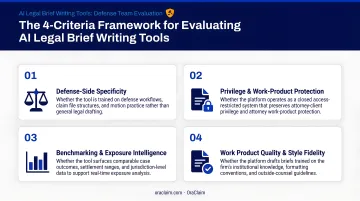
These criteria were weighted with defense-side professionals in mind. High claim volumes, reactive drafting workflows, carrier reporting requirements, and the need to benchmark prior case outcomes against open matters are realities that plaintiff firms and transactional lawyers don't face at the same scale.
The most common mistake defense teams make is choosing a tool based on name recognition — ChatGPT, Claude — rather than legal-task suitability. General-purpose models carry real citation risk:
- Hallucination exposure: Mata v. Avianca demonstrated the professional consequences of unverified AI-generated citations
- No privilege protection: Consumer-grade models typically lack the zero-data-retention and access controls that defense work requires
- No defense-workflow fit: Generic tools aren't trained on claim files, carrier reporting formats, or dispositive motion practice
Human attorney review and citation verification aren't optional steps — they're the difference between a usable draft and a sanctions risk.
Conclusion
The right AI tool depends on where your bottleneck actually is:
- Citation verification → Clearbrief
- Argument strength and authority → Lexis+ Brief Analysis
- Writing quality and persuasiveness → BriefCatch
- Full litigation drafting tied to verified legal databases → CoCounsel
- End-to-end defense-specific platform → OraClaim
When evaluating options, drafting speed is only part of the equation. Before committing to a platform, pressure-test it on three questions:
- Does it protect client data and preserve privilege?
- Does it fit into existing workflows, or does it create a parallel system to maintain?
- Was it built for the defense side — or is it a plaintiff or transactional tool adapted for your use case?
Defense teams that need a platform built specifically for their side of the docket — one that cuts non-billable review time, surfaces the facts that move cases, and benchmarks outcomes against prior matters — should explore OraClaim.
Frequently Asked Questions
Can AI draft a motion for summary judgment?
Yes. AI tools can generate a structured first draft of a motion for summary judgment using case facts and legal arguments provided by the attorney. The final product must be thoroughly reviewed, verified for citation accuracy, and refined by a licensed attorney before filing.
Is it ethical for lawyers to use AI to draft legal motions?
Most bar associations permit AI-assisted drafting provided the attorney maintains competence, supervises the output, and discloses AI use where local court rules require it. ABA Formal Opinion 512 (2024) and opinions from the NYC Bar, DC Bar, Florida Bar, and California Bar all support this position.
What is the risk of citation hallucination in AI brief writing?
General-purpose AI tools can generate fictitious case citations, as seen in Mata v. Avianca where attorneys were sanctioned $5,000 for filing a ChatGPT-generated brief containing fabricated cases. Citation-verification tools like Clearbrief are essential for any AI-assisted brief before it reaches a court.
How do AI brief-writing tools handle confidential client information?
Legal-specific AI tools typically operate under SOC 2 compliance and zero-retention commitments, meaning documents are not stored or used for model training. Attorneys should verify a tool's specific data policy before uploading sensitive materials, since SOC 2 certification and zero-retention agreements are not the same thing.
Can AI tools for brief writing integrate with practice management systems?
Many legal AI tools integrate with practice management and document management platforms, letting attorneys pull case data directly into drafts. OraClaim, for example, integrates with Clio, MyCase, NetDocuments, and iManage upon customer request, keeping client data within a controlled environment throughout the workflow.
Do defense lawyers need different AI tools than plaintiff attorneys?
Yes. Defense teams manage higher claim volumes, reactive drafting workflows, carrier reporting requirements, and a need to benchmark prior case outcomes — challenges that plaintiff or transactional tools aren't built for. Platforms like OraClaim are designed specifically for this workflow, while general legal writing tools are optimized for very different use cases.