AI can close that gap — but only when it's deployed correctly. Subscribing to a tool and expecting litigation-ready documents is where most integration attempts stall. Output quality depends entirely on how well your team prepares, which tool you choose, how you structure your prompts, and how rigorously you review every draft before it leaves the firm.
This guide covers what you need before you start, a step-by-step integration process, the variables that determine output quality, and the mistakes that cause most AI drafting efforts to fail.
Key Takeaways
- AI generates litigation-ready first drafts in seconds when given the right tool, structured inputs, and a defined review process
- High-volume defense teams see the greatest gains when AI is embedded in structured workflows — not used ad hoc
- Purpose-built legal AI outperforms general tools by accounting for jurisdiction, document format, and confidentiality requirements
- Attorney review is non-negotiable — every AI-generated draft requires verification before use
- Most integration failures trace back to skipped setup steps and treating AI output as final
What You Need Before Integrating AI Into Your Legal Drafting Workflow
Preparation determines whether AI accelerates your workflow or adds friction. The teams that struggle most with AI integration are almost always the ones that skipped this phase. Three areas require attention before you commit to any platform: your document inventory, system compatibility, and security readiness.
Workflow and Document Inventory
Start by listing the document types your team produces most frequently. Demand responses, coverage opinion letters, motions to dismiss, case status reports, 90-day reports to carrier, reserve memos — identify which are high-volume and structurally consistent. Those are where AI delivers the fastest returns. Save complex, judgment-heavy documents for later in the rollout.
Tool and System Compatibility
Before committing to any platform, confirm it integrates with your existing practice management or document management system. Duplicate data entry kills efficiency gains before you ever see them. OraClaim, for example, integrates with Clio, iManage, NetDocuments, and other common defense firm systems — built to fit into existing legal tech stacks rather than replace them.
Security and Compliance Readiness
This step is not optional. Before entering any case data into an AI drafting tool, verify:
- Whether the platform trains AI models on your client data — OraClaim contractually prohibits this, with no confidential information used to train, fine-tune, or improve any AI model
- What encryption and authentication standards apply, and whether data is handled within a closed, access-restricted environment
- What your state bar requires: ABA Formal Opinion 512 (July 2024) holds that lawyers using generative AI must address competence, confidentiality, supervision, and candor obligations — Florida, California, and New York have each issued additional guidance requiring specific confidentiality checks before using third-party AI tools
How to Integrate AI Into Your Legal Drafting Workflow
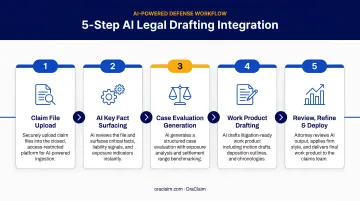
Step 1: Standardize Your Document Templates and Source Materials
Audit your existing templates and precedent documents before feeding anything to an AI tool. AI produces better output when it has reliable, structured reference material to work from. Outdated or inconsistent drafts degrade output quality from the start.
Templates used as AI reference documents must meet three conditions:
- Jurisdiction-specific and reflective of current law
- Consistent in format and language across the document type
- Approved by a supervising attorney before use as a reference
OraClaim's custom work product module trains on a firm's own historical work product, brief banks, citation conventions, and style preferences — which means the quality of your firm's reference library directly determines the quality of what the AI produces.
Step 2: Define Structured Prompts for Each Document Type
Vague prompts produce generic output. "Draft a motion to dismiss" returns something unusable. A structured, layered prompt returns a first draft worth reviewing.
For each document type your team handles, build a prompt template that includes:
- Document type — be specific (motion to dismiss for failure to state a claim, not just "motion")
- Jurisdiction — court, state, applicable procedural rules
- Parties — named parties and their roles
- Governing law — relevant statutes, case law standards
- Key facts — the actual factual record the document must reflect
- Required clauses or arguments — any non-negotiable positions
- Tone and format — court-ready, carrier-facing, formal, or client-facing
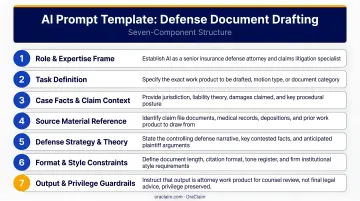
Build these templates once, save them, and use them consistently across your team. Ad-hoc prompting per document produces inconsistent output and drives up revision time. Once templates are set, the real calibration happens in practice — which is where a controlled pilot comes in.
Step 3: Run a Controlled Pilot on Low-Complexity Documents
Before deploying AI across your full caseload, test on lower-stakes document types:
- Status reports
- Boilerplate demand responses
- Standard coverage letters
This is how you calibrate output quality and identify where human correction is needed before errors compound across a large caseload.
During the pilot, track two metrics: time spent on AI-assisted drafts versus traditional drafting, and revision cycles required per document. A Thomson Reuters survey of more than 2,200 legal and risk professionals found that AI could save professionals 12 hours per week within five years, with 4 hours per week achievable within the first year. A structured pilot gives you real data on where those gains are actually materializing in your specific workflow.
Step 4: Build a Mandatory Review Protocol
Every AI-generated document requires attorney review before it leaves the firm. No exceptions. Build a review checklist and make it non-negotiable:
- Verify all citations — confirm they are real, accurate, and applicable
- Check jurisdiction-specific language for accuracy
- Confirm the document reflects the actual facts of the matter, not AI assumptions
- Review tone and format against the intended recipient and context
- Obtain supervising attorney sign-off before filing or sending externally
Courts are formalizing this expectation. Judge Nina Y. Wang's standing order in D. Colo. (effective December 2025) requires a signed AI Certification on every filing attesting that a human reviewed AI-generated language and verified all citations as actual, non-fictitious authority.
Step 5: Expand Gradually and Measure Performance
After the pilot demonstrates consistent output quality, expand systematically to higher-complexity documents — deposition outlines, dispositive motions, coverage opinions. Continue tracking:
- Drafting time per document
- Revision cycles required
- Error rates before and after attorney review
- Attorney hours reallocated to strategic work
Integration is iterative. As you accumulate output data, refine your prompts, update reference templates when the law changes, and adjust tool settings accordingly. The teams that see compounding gains are the ones that schedule prompt reviews the same way they schedule case reviews — regularly and with accountability.
Key Parameters That Affect AI-Generated Legal Draft Quality
Outcomes from AI drafting tools are not uniform. Four variables determine whether AI accelerates your workflow or generates more rework.
Prompt Specificity
The more context AI receives, the closer the output aligns to a usable first draft. Jurisdiction, document type, party roles, and factual details must all be embedded in the prompt. Vague prompts require significantly more revision cycles, eroding the time savings AI is supposed to deliver.
Tool Legal Specificity
General-purpose AI tools lack legal-specific training, citation verification, and jurisdictional awareness. Stanford HAI research found that legal AI tools hallucinate in 1 out of 6 or more benchmark queries — and that figure climbs with tools that were never trained on legal datasets. For court documents and coverage letters, purpose-built legal AI is a risk management requirement, not a stylistic preference.
Quality of Reference Materials
AI that draws from uploaded case documents, prior filings, and firm-approved clause libraries produces more accurate, contextually grounded drafts than AI working from a prompt alone. OraClaim's claim file ingestion process pulls medical records, prior pleadings, discovery responses, expert reports, and correspondence — giving the AI the full factual record before generating any draft.
Human Review Discipline
AI can hallucinate citations, miss jurisdiction-specific nuances, and misapply legal standards. Three recent sanctions cases illustrate what happens when verification steps are skipped:
- Mata v. Avianca — $5,000 sanction for unverified AI-generated citations
- Park v. Kim — Second Circuit grievance referral for filing fabricated case law
- Noland v. Land of the Free — $10,000 sanction issued in 2025
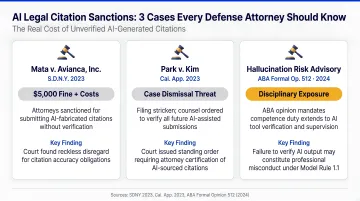
All three attorneys submitted AI-generated content without reviewing it. Firms with a structured verification protocol before any AI document is filed produce higher-quality output and stay on the right side of their ethical obligations.
Common Mistakes to Avoid When Using AI for Legal Drafting
Even well-intentioned AI rollouts fail when defense teams skip the fundamentals. These are the most common errors to avoid:
- Skipping the pilot phase and deploying AI directly across high-complexity documents — errors compound across a large caseload before anyone catches them
- Using general-purpose AI tools (ChatGPT, consumer assistants) for court filings or coverage opinions — fabricated citations have cost attorneys their standing before the court and triggered sanctions
- Freestyle prompting without structure — long, disorganized prompts produce inconsistent output; build templated prompt structures for each document type
- Failing to update reference materials — AI grounded in outdated firm templates or superseded case law will keep producing inaccurate drafts without flagging the problem
When AI Legal Drafting Makes Sense — And When It Doesn't
AI-assisted drafting is not equally effective across all document types. Knowing where it fits prevents teams from deploying it where it creates more risk than it resolves.
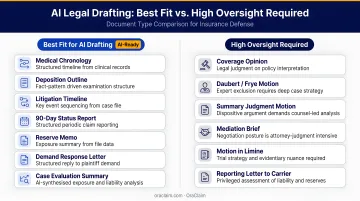
Where AI drafting works best:
- High-volume, structurally consistent documents where facts change but format and legal framework stay stable
- Demand responses, status reports, 90-day carrier reports, standard coverage letters, reserve memos
- Defense teams managing large claim portfolios, where AI can produce first drafts at scale without sacrificing consistency
- Thomson Reuters has reported that some carriers already generate approximately 50,000 claims-related communications daily using AI
Where AI requires significant additional oversight:
- Complex, multi-jurisdictional documents with competing legal standards
- Documents requiring sophisticated strategic judgment — nuanced coverage arguments, novel litigation theories
- Matters where the factual record is incomplete or disputed, making AI's reliance on provided inputs a liability
Volume is where the efficiency gains concentrate. For defense teams managing dozens of similar matters simultaneously, AI can compress what was a full day of document review into under 30 minutes. For a novel coverage dispute requiring original legal analysis, AI is better deployed on supporting tasks — claim file review, chronology drafting, exposure benchmarking — rather than primary document drafting.
Conclusion
Integrating AI into a legal drafting workflow delivers real efficiency gains for defense teams, but only when the setup is deliberate. Four components must work together:
- The right tool, built for defense work
- Structured prompts that constrain output to relevant facts
- Reliable reference materials loaded into every session
- A mandatory attorney review protocol before anything goes out
Most integration failures come from skipping preparation or expecting AI to replace attorney judgment. The teams seeing the strongest results treat AI as a drafting partner: it handles the first draft, they handle the thinking. Platforms like OraClaim are built around exactly that model — purpose-built for defense teams who need AI that produces usable work product without creating new review burdens.
Frequently Asked Questions
What is the best AI program for legal drafting?
The best choice depends on your practice context. Purpose-built legal AI tools outperform general-purpose options for court documents and professional correspondence because they're trained on legal datasets and understand jurisdictional nuance. Defense teams should prioritize platforms built for the defense workflow that do not train AI models on client data.
Can AI replace lawyers in legal document drafting?
No. AI generates first drafts that still require attorney review for accuracy, legal judgment, and ethical compliance. The attorney's role shifts toward directing, reviewing, and validating AI output rather than writing from a blank page .
How do I ensure AI-generated legal documents are accurate?
Apply a mandatory review checklist to every AI draft: verify citations, confirm jurisdiction-specific language, check facts against the actual case record, and have a supervising attorney approve the document before it's sent or filed.
What security considerations should I review before using AI for legal drafting?
Confirm the platform does not train on client data, verify encryption and authentication standards, and ensure data handling practices align with your state bar's confidentiality guidance — both Florida Opinion 24-1 and ABA Formal Opinion 512 require these checks before use.
How long does it take to integrate AI into a legal drafting workflow?
Plan on several weeks: start with a one-to-two week pilot on low-complexity documents, then expand as prompt templates and review protocols are refined. Firms that rush this process typically see lower quality output and higher revision time, not the efficiency gains they expected.
Is using AI for legal drafting compliant with ABA ethical rules?
AI drafting is permissible under ABA Model Rules when attorneys understand the tool's capabilities and limitations, maintain supervision over all AI-generated work product, protect client confidentiality, and are competent to review and verify AI output before use. ABA Formal Opinion 512 (2024) provides the governing framework.