](https://file-host.link/website/oraclaim-0psh24/assets/refined-images/1781091243357000_7d57373d39d3441d9ece7b61f52921ad/360.webp)
Introduction
Defense teams and claims professionals are drowning in documents. Medical records, depositions, incident reports, expert analyses, and correspondence pile up across every matter — yet the knowledge buried in those files almost never travels from one case to the next.
The deeper problem is structural. Document management systems hold files; case management systems track the matter — and neither connects to the other in a way that makes prior knowledge usable. Attorneys and adjusters end up re-learning facts that already exist somewhere in the organization's history, on every new matter.
That gap is well-documented. According to the 2025 Thomson Reuters Legal Department Operations Index, 33% of legal departments underutilize knowledge management, and 73% plan to use technology to automate legal tasks and reduce costs — a clear signal that having tools and actually activating them are two different things.
This post covers what integrating a knowledge base with document workflows and case management actually looks like, how it differs from plain document storage, and what it means in practice for defense teams managing high claim volumes.
Key Takeaways
- A knowledge base management system (KBMS) organizes and activates institutional knowledge, not just stores it
- Document management systems handle custody and retrieval; knowledge bases handle comprehension and reuse
- Integration means documents are automatically ingested, extracted, and indexed rather than manually re-filed
- Past case data becomes forward-looking defense intelligence when connected to case management
- AI accelerates every layer of the workflow — from ingestion and extraction to retrieval and pattern recognition
What Is a Knowledge Base Management System — and How Does It Fit Legal and Claims Work?
The Association of Corporate Counsel defines knowledge management as capturing, distributing, and effectively using both structured and tacit knowledge assets — including legal work product and experience-based understanding. A knowledge base management system (KBMS) is the infrastructure that makes that possible.
The key distinction from passive file storage: a KBMS is built to surface relevant knowledge for the right person when they need it. Documents aren't just deposited — they're organized, indexed, and made retrievable in ways that match how legal and claims work actually happens.
Why This Matters for Defense Teams Specifically
Attorneys and adjusters constantly re-learn facts that already exist somewhere in the organization. Deposition patterns, expert witness history, damages benchmarks, venue tendencies — all of this gets rebuilt from scratch on each new matter because the knowledge from prior cases isn't structured or searchable.
A KBMS changes that by capturing institutional knowledge and making it reusable:
- Prior settlement ranges for similar fact patterns become searchable comparables across your case history
- Expert witness history is tagged, not buried in old file folders
- Damages benchmarks from closed cases inform reserve decisions on new ones
- Jurisdictional outcome data surfaces automatically rather than requiring manual research
The Integration Imperative
A KBMS doesn't replace existing practice management or document management tools. It connects to them — adding an analysis layer that puts data already sitting inside those systems to work. OraClaim, for example, integrates with practice management platforms including Clio, MyCase, and PracticePanther, and document management platforms including iManage, NetDocuments, and Worldox. The existing infrastructure stays in place; the knowledge layer makes it useful.
What Is the Difference Between a Knowledge Base and a Document Management System?
These two categories solve different problems. Conflating them is one of the most common reasons legal and claims teams invest in tools that don't actually change how work gets done.
What a DMS Does
According to the ABA, document management software is designed to save all documents — including email — to central storage, with matter-related information used to organize them. Core DMS capabilities include:
- Full-text search and version control
- Check-in/check-out workflows
- Access permissions and audit trails
- Integration with primary office suites
Platforms like iManage, NetDocuments, and SharePoint are built around custody and retrieval. Their job is to make sure the right file is accessible to the right person. What they don't do is tell you anything meaningful about what's in those files.
What a Knowledge Base Adds
A knowledge base is designed for comprehension and reuse. It structures information so that patterns emerge, answers surface on demand, and prior work informs current decisions. Where a DMS answers "where is this file?", a knowledge base answers "what does it mean and how does it apply?"
| Capability | Document Management System | Knowledge Base |
|---|---|---|
| File storage & retrieval | ✅ | ✅ |
| Version control | ✅ | Limited |
| Fact extraction | ❌ | ✅ |
| Pattern recognition across cases | ❌ | ✅ |
| Proactive insight surfacing | ❌ | ✅ |
| Benchmarking against prior cases | ❌ | ✅ |
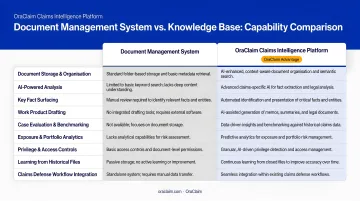
To make it concrete: a DMS tells you where last year's expert report lives. A knowledge base tells you what that expert said, how courts received it, and how similar cases resolved. It draws from the entire case portfolio — not just one file.
How Knowledge Bases Integrate with Document Workflows
Workflow-level integration transforms documents into live inputs for case analysis — surfaced, structured, and searchable from the moment they enter the system.
The Ingestion Layer
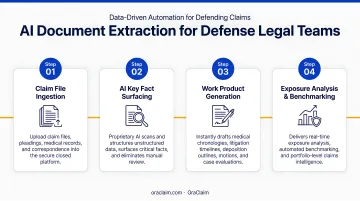
Documents — pleadings, medical records, discovery files, correspondence — enter the workflow from multiple sources and get automatically ingested and parsed. In a properly integrated system, no manual tagging or re-filing is required.
Files flow directly from the DMS or connected practice management platform into the knowledge base, where they are classified and indexed.
OraClaim, for instance, automatically ingests entire claim files — medical records, demand packages, police reports, witness statements, expert reports, prior pleadings, and correspondence — classifying every document and extracting every fact without manual data entry.
Structured Extraction
Unlike raw file storage, an integrated knowledge base pulls and tags key facts during ingestion. For defense teams, this means:
- Medical data: Date, provider, diagnosis, treatment, medication, complaint, outcome — extracted from every record type including ER reports, IME reports, specialist notes, and imaging results
- Liability indicators: Treatment gaps, pre-existing conditions, prior accidents, causation inconsistencies, and timeline conflicts
- Temporal data: Every dated event — incident dates, discovery deadlines, deposition dates, motion practice, mediation dates — rendered as a searchable, exportable timeline
- Contradictions and gaps: Inconsistencies between subjective complaints and objective findings surfaced automatically before they become trial-day surprises
Workflow Triggers and the Output Side
When a new document enters an integrated system, it doesn't just sit in a folder. The system can:
- Flag relevant precedents from prior cases with similar fact patterns
- Surface matching expert witness history and reliability data
- Issue exposure-change alerts to assigned attorneys, adjusters, and claims managers
- Re-run benchmarking comparisons automatically
What comes out of this process is just as important as what goes in. An integrated workflow produces litigation-ready work product from day one: medical chronologies, case timelines, key fact summaries, and deposition outlines generated from ingested documents rather than built from scratch.
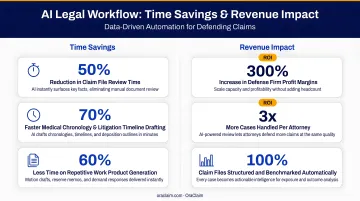
Work that traditionally consumed 40–70% of associate hours per matter gets cut roughly in half — freeing defense teams to focus on strategy rather than document assembly.
Integrating a Knowledge Base with Case Management
Connecting a knowledge base to case management changes what a case record actually does. Instead of storing documents, it becomes a queryable source of decision-ready intelligence.
Past Case Data as Forward-Looking Intelligence
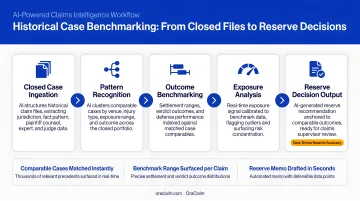
When a knowledge base integrates with case management, closed cases don't go dark. Their outcomes, strategies, expert decisions, and damages data are structured and benchmarked. New cases are automatically compared against this history.
OraClaim's Historical Case File Structuring & Benchmarking module, for example, transforms years of unstructured PDFs, scanned files, and practice management exports into structured data covering:
- Case type, jurisdiction, venue, judge
- Plaintiff counsel and plaintiff expert performance
- Reserve history, settlement amounts, verdict amounts
- Dispositive motion outcomes and mediation results
- Time-to-resolution and defense costs by phase
Every new claim is then automatically benchmarked against this history — surfacing similar-case settlement ranges, plaintiff-counsel outcome patterns, judge-specific motion-grant rates, and expert reliability data. This shifts reserve-setting from gut instinct to data-backed decisions.
Portfolio-Level Oversight
Case-by-case management doesn't scale. Claims managers and supervising attorneys need to see across the portfolio to identify where risk concentrates — and the numbers make that pressure concrete.
WTW's Claim Cost Index reported legal costs increased 35.62% from 2013 to 2023. The Triple-I reported U.S. property claims volume rose 36% in 2024, with catastrophe claims up 113%. No single-case view can absorb that exposure.
An integrated knowledge base delivers portfolio-level dashboards that surface:
- Which case types are running over budget
- Which jurisdictions produce outlier verdicts
- Where cycle times are longest
- Panel-firm cost outliers and under-reserved cohorts
- Reserve-vs.-paid trajectory by line of business
That visibility — from individual case benchmarks to portfolio-wide cost trajectories — is what separates reactive claims handling from strategic defense management.
The Role of AI in Connecting Knowledge Bases to Legal Document Workflows
AI doesn't change what a knowledge base is — it changes what one can do at scale.
Automated Ingestion and Extraction
AI-powered knowledge base systems read documents, they don't just store them. Natural language processing identifies key facts, flags inconsistencies, and extracts structured data from unstructured documents at a speed no manual review process matches.
According to Wolters Kluwer's 2026 Future Ready Lawyer Survey, 62% of legal professionals experienced weekly time savings of 6–20% from AI, with 52% reporting revenue increases in the same proportion. For claims and defense work specifically, Deloitte reported AI-powered solutions can enable insurers to handle 10x more documents across 2,000+ document types.
Semantic Retrieval and the Feedback Loop
Instead of keyword search, AI enables attorneys to query in plain language — retrieving sourced answers from across the case file rather than manually hunting through folders. This changes the nature of legal research from document retrieval to conversational querying.
As more cases flow through an AI-integrated system, the knowledge base also becomes more predictive:
- Facts that correlate with specific outcomes get weighted
- Strategies that succeed in particular venues are identified
- Risk concentrations across the portfolio become visible earlier
That predictive value only holds, however, if the underlying data stays protected. Which is where security becomes the deciding factor in any AI integration.
Security as a Non-Negotiable
AI integration in legal settings must meet strict data security requirements. ABA Formal Opinion 512 (2024) makes clear that lawyers using generative AI must satisfy duties of competence and confidentiality — and the NYSBA has specifically warned that AI must not compromise attorney-client privilege.
When evaluating any AI-powered knowledge base for legal or claims use, verify:
- Encryption at rest and in transit
- Role-based access controls
- Audit logging
- Prohibition on using client data to train external AI models
- Contractual sub-processor restrictions
OraClaim operates as a closed, access-restricted system that expressly prohibits confidential information from being used to train, fine-tune, or improve any AI models. The platform treats all processing as an extension of the customer's own computing environment, not a disclosure to a third party, preserving attorney-client privilege and work-product protection.
Frequently Asked Questions
What is a knowledge base management system and how does it integrate with document workflows and case management systems?
A KBMS is a centralized system for organizing and activating organizational knowledge. Integration with document workflows means documents are automatically ingested, classified, and indexed. Integration with case management means that knowledge enriches individual case records and the broader portfolio view — connecting each matter to the patterns and outcomes embedded across the full case history.
What is the difference between a knowledge base and a document management system?
A DMS handles file storage, retrieval, version control, and custody. A knowledge base is built for comprehension and reuse — surfacing patterns, extracting insights from ingested documents, and making prior work actionable in current cases. Where a DMS stores files, a knowledge base turns them into intelligence you can act on.
What are some examples of knowledge base tools that integrate with document workflows and case management systems?
General-purpose platforms include Confluence, SharePoint, Guru, and ServiceNow — but these lack the defense-specific data types, security architecture, and workflow depth that insurance defense requires. OraClaim is purpose-built for the defense ecosystem, integrating with iManage, NetDocuments, Clio, and similar tools while layering AI-powered claims intelligence on top.
How does a knowledge base improve case outcomes for defense lawyers?
By making prior case outcomes, expert history, and damages benchmarks searchable and comparable, a knowledge base helps defense attorneys build stronger strategies faster. OraClaim, for example, can reduce medical chronology drafting from 15–60+ hours to under 60 minutes and produce full case evaluations in minutes — while benchmarking every matter against historical settlement and verdict data.
What security standards should a legal knowledge base meet?
At minimum: encryption at rest and in transit, role-based access controls, audit logging, and applicable data protection compliance. Legal platforms must also prohibit client data from training external AI models and preserve attorney-client privilege and work-product protection throughout.
How does AI change the way knowledge bases work in case management?
AI enables automated fact extraction from unstructured documents, semantic search across case files, and predictive pattern recognition across historical cases. The result is a knowledge base that doesn't wait to be searched — it surfaces relevant intelligence on demand, turning a passive document repository into an active decision-support system.