Introduction
Defense teams are drowning in paper. Medical records arrive by fax. Deposition transcripts land in email. Expert reports get saved to folders no one agrees on. By the time a demand deadline hits, someone is manually combing through hundreds of unsorted documents looking for a treatment date from 18 months ago.
According to Thomson Reuters, attorneys already spend roughly 40% of working time on administrative tasks rather than legal work. That figure climbs as claim volumes increase. Meanwhile, plaintiff firms are building workflows around technology that ingests, classifies, and turns case data into strategic advantage — before defense teams have finished sorting their inbox.
That gap compounds with every case added to the docket. This post covers the best tools for automating claims file organization, the practices that make automation work, and how to choose the right solution for a defense-side operation.
Key Takeaways
- Disorganization is a direct cost — unstructured files burn non-billable hours and expose defense teams at critical deadlines
- A litigation-ready file needs consistent taxonomy: incident reports, coverage docs, medical records, discovery, expert opinions
- AI, OCR, and workflow automation classify and surface documents at intake, eliminating batch sorting entirely
- Purpose-built tools outperform generic DMS platforms for claims-specific workflows
- The tools that stick integrate with existing systems, meet security requirements, and scale with caseload
Why Claims File Chaos Hurts Defense Outcomes
The Cost of Disorganization
The average 8-hour workday produces roughly 2.9 billable hours per attorney, according to Clio's research — and document review is a major reason the rest disappears. When claims files have no consistent structure, attorneys spend time searching rather than analyzing. Duplicate review happens constantly: the same medical record gets pulled three times because no one knows where it was filed the first two.
The downstream effects compound quickly:
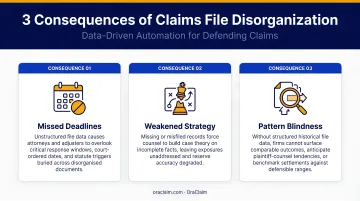
- Missed deadlines — ABA malpractice data shows scheduling and administrative errors account for nearly 28% of legal malpractice claims, a risk that multiplies when critical documents are buried in disorganized folders
- Weakened strategy — facts buried in unsorted files don't inform early case evaluations or reserve decisions
- Pattern blindness — without structured data across a portfolio, carriers and defense firms can't identify which fact patterns drive high verdicts, which plaintiff experts are unreliable, or which jurisdictions require different reserve postures
The Scale Problem
A single adjuster managing 80 active claims with no standardized taxonomy creates a retrieval nightmare. Every attorney and adjuster has their own folder conventions — some by claimant name, some by date of loss, some by claim number.
That inconsistency compounds fast. The firm loses institutional memory every time someone leaves or a matter transfers.
CLM Magazine has reported that roughly 97% of insurance claims data is unstructured, spread across adjuster notes, scanned documents, email attachments, and recorded statements. Manual filing conventions simply can't manage that volume consistently.
The Plaintiff Asymmetry
That volume problem creates a direct competitive gap. Plaintiff firms are processing demand packages faster, identifying the same treating physician's pattern of inflating diagnoses, and surfacing the same inconsistencies defense teams miss — because their files are organized enough to search.
By the time a defense team finishes locating documents, plaintiff counsel has already shaped the narrative heading into depositions.
Top Tools for Claims File Organization Automation
These tools were evaluated on automation capability, claims-specific functionality, security, and ability to scale across high-volume defense operations.
OraClaim
OraClaim is an AI-powered platform built specifically for defense lawyers and claims professionals, not adapted from a general enterprise document tool. Co-founders Mark Tepper and Andy Anderson both worked on the defense side and built OraClaim to solve the exact problem they experienced firsthand: unstructured claim files slowing down every aspect of defense work.
The platform automatically ingests entire claim files — medical records, incident reports, demand packages, deposition transcripts, expert reports, coverage documents, discovery responses, correspondence — and classifies every document without manual intervention.
It goes further than organization: OraClaim surfaces the facts that drive exposure, flags contradictions and treatment inconsistencies, and benchmarks each case against historical closed files.
| Feature | Detail |
|---|---|
| Purpose-Built Focus | Designed exclusively for defense lawyers and claims managers — personal injury, trucking, premises liability, workers' comp, professional liability, and more |
| AI Capabilities | Auto-classifies documents, extracts key facts with citation links, flags contradictions, benchmarks against historical cases by jurisdiction, judge, plaintiff counsel, and expert |
| Security & Access Controls | Closed, access-restricted system preserving attorney-client privilege and work product protection; client data is never used to train AI models |
| Integrations | Connects with Clio, MyCase, Smokeball, PracticePanther, NetDocuments, iManage, Worldox, and Box |
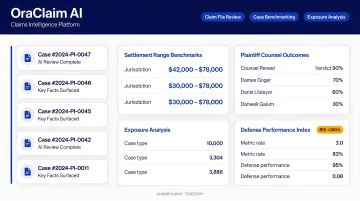
OraClaim also includes separate modules for medical chronology drafting (first draft under 60 minutes), litigation timeline creation, deposition outline drafting, and real-time portfolio-level exposure monitoring — all driven by the same underlying claim file data.
iManage
iManage is a knowledge work platform used by over 1 million legal professionals across 4,000 organizations globally. It provides matter-centric document and email management with strong version control and AI-enhanced search.
iManage AI Enrichment automatically classifies documents by type and extracts key information points, while Ask iManage offers generative AI for natural-language queries and document summarization.
| Feature | Detail |
|---|---|
| Primary Use Case | Matter-centric document and email management for law firms and corporate legal teams |
| AI Features | AI Enrichment for auto-classification; Ask iManage for natural-language search and summarization |
| Security | ISO 27001:2022, ISO 27701, SOC 2 Type 2 certified; customer data not used to train AI models by default |
iManage works well for firms that need well-structured document infrastructure. Defense-side firms such as Huff, Powell & Bailey use it to organize and secure litigation knowledge across active matters.
Relativity
For litigation-heavy claims, RelativityOne is the dominant e-discovery and document review platform. Its Active Learning tool uses machine learning to prioritize relevant documents, learning from reviewer decisions and surfacing the most likely-relevant items first. Review queues can scale to handle workflows exceeding 10 million documents.
| Feature | Detail |
|---|---|
| Primary Use Case | E-discovery and large-scale document review for complex, multi-party litigation |
| AI Features | Active Learning for document prioritization; analytics for issue spotting across large document sets |
| Scalability | Supports review queues exceeding 10M documents; pay-as-you-go or commitment pricing tiers available |
Relativity is most valuable when claim volumes are massive and litigation complexity demands structured review workflows — mass tort situations, complex commercial claims, and large carrier e-discovery productions.
NetDocuments
Built for legal professionals, NetDocuments is a cloud-native document management system. Its matter-based organization, version control, and automated retention rules reduce administrative overhead, while cloud-first architecture means adjusters and attorneys access the same claims file from any location.
| Feature | Detail |
|---|---|
| Primary Use Case | Cloud-based document management for legal teams needing remote access and collaboration |
| Organization Features | Matter-centric filing, automated naming conventions, version history, retention scheduling |
| Integrations | Microsoft 365 (Word, Excel, Outlook, Teams), Clio, Aderant Handshake; ISO 27001, SOC 2 Type 2, HIPAA compliance support |
NetDocuments suits insurance defense firms that need accessible, well-organized document repositories with strong compliance credentials and Microsoft ecosystem compatibility.
Hyland OnBase
Hyland OnBase is an enterprise content management platform used by more than 500 insurance customers, including property and casualty carriers, managed general agents, and third-party administrators. Its OCR-based document capture converts paper and fax-received claims documents into searchable digital files, and its rules-based routing automatically moves documents to the correct claims folder based on content. OnBase also integrates directly with Guidewire for claims, policy, and billing workflows.
| Feature | Detail |
|---|---|
| Primary Use Case | High-volume claims document capture, classification, and workflow routing for insurance carriers |
| Automation Features | OCR ingestion, automated document classification, rules-based routing to claims folders |
| Target User | Large carriers and TPAs managing hundreds of simultaneous claims; enterprise contract pricing |
OnBase fits large carrier operations that need to automate document intake at scale — especially where paper and fax are still part of the intake pipeline and volume alone creates a bottleneck.
Best Practices for Automating Claims File Organization
Establish a Standardized Taxonomy First
Before deploying any tool, define the document types every claims file must contain. Automation can't categorize what you haven't defined — and without this foundation, even sophisticated AI tools produce inconsistent outputs.
- Incident and accident reports
- Coverage and policy documents
- Medical records and bills
- Correspondence
- Discovery and pleadings
- Expert reports and IME/DME reports
- Reserve and settlement documentation
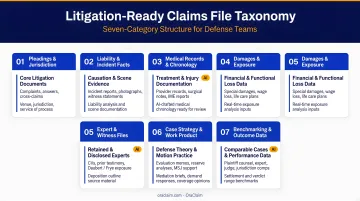
This taxonomy becomes the logic layer every automation rule depends on.
Automate at the Point of Receipt
Batch review builds backlogs. The highest-value automation happens when documents are classified and filed the moment they arrive — by email, fax, or upload. OCR and AI-based intake tools read document content and route files to the correct folder without manual intervention.
OraClaim does this automatically across all incoming document types, so claims files organize themselves as new materials arrive rather than accumulating in an unsorted queue.
Use Metadata, Not Just Folder Names
Folder hierarchies break down at scale. Metadata fields — claimant name, date of loss, document type, matter number, jurisdiction — let attorneys and adjusters retrieve any document in seconds regardless of folder structure. Configure automation tools to populate these fields from document content automatically. File names indicate location; metadata identifies what a document actually is and makes it searchable.
Build Privilege Separation Into the Structure
Automated organization must account for attorney-client privilege and work product protection from the start. Privileged communications and attorney analysis need structural separation from non-privileged materials — not an afterthought bolted on later.
Role-based access controls should enforce who can view sensitive content within each matter. OraClaim's closed, access-restricted architecture handles this by design, with client data never used for AI training and collaboration permissions fully configurable per matter.
Treat Automation as a Continuous Process
Classification rules and AI models improve as they process more claims. To get compounding returns, build a regular review cadence into your workflow:
- Review file organization logic quarterly and update rules as claim types evolve
- Flag mis-categorized documents to improve AI accuracy over time
- Track metrics like retrieval time and non-billable review hours to measure impact
The ROI compounds as the system matures. OraClaim's benchmarking capability, for example, becomes more accurate as it processes more historical closed files and builds a more accurate comparable set.
How to Choose the Right Claims File Automation Tool
Defense-Side Specificity Matters
A DMS built for transactional law or general enterprise use lacks claims-specific document types, litigation workflows, and the intake logic that defense operations require. Evaluate tools based on whether they understand the claims file lifecycle — from intake through resolution — not just whether they organize documents cleanly.
OraClaim was built by former litigators and claims professionals specifically for this workflow. Platforms like iManage and NetDocuments are strong general legal DMS choices but require significant configuration to reach the same depth of claims-specific organization out of the box.
Confirm Integrations Before Committing
If a tool creates a separate workflow or requires double-entry of data, adoption will stall. Verify that the platform connects with the systems your team already uses:
- Practice management: Clio, MyCase, Smokeball, PracticePanther, Aderant
- Document management: iManage, NetDocuments, Worldox, Box
- Claims systems: Guidewire (confirmed for Hyland OnBase)
OraClaim integrates with Clio, MyCase, Smokeball, PracticePanther, NetDocuments, iManage, Worldox, and Box — meaning it layers onto existing infrastructure rather than replacing it.
Security and Compliance Are Non-Negotiable
Claims files contain personal health information, legal strategy, and financial data subject to HIPAA, state bar confidentiality rules, and carrier data security policies. Before evaluating any other feature, confirm:
- End-to-end encryption for data in transit and at rest
- Role-based access controls and comprehensive audit trails
- Whether the vendor uses your data to train AI models (a significant privilege risk)
- BAA availability if the platform processes protected health information
OraClaim explicitly prohibits client data from being used to train, fine-tune, or validate its AI models. For defense teams managing privileged files, that prohibition is a prerequisite — not a bonus feature.
Conclusion
Disorganized claims files aren't a minor inconvenience. They cost defense teams billable efficiency, weaken litigation strategy, and create the exact information asymmetry that plaintiff firms exploit. The right automation tool, paired with a standardized file taxonomy, removes that disadvantage permanently.
If you're a defense lawyer, claims manager, or carrier ready to eliminate manual document review and build a litigation-ready operation, OraClaim is built for exactly that. The platform handles the full defense workflow: organizing incoming claims data, surfacing critical facts, benchmarking against historical cases, and connecting with the systems your team already uses.
Request a demo to see how defense teams are cutting review time in half and reclaiming the advantage.
Frequently Asked Questions
Is there an AI that can organize files?
Yes. AI-powered platforms automatically ingest, classify, and route documents by reading their content rather than relying on manual filing. In the claims context, OraClaim extracts key facts, flags contradictions, and benchmarks cases against historical data — going well beyond folder sorting.
What type of tool would help you organize your files?
For claims professionals, the most effective tools combine AI document classification, metadata tagging, and workflow automation. Purpose-built platforms for legal and insurance workflows handle claims-specific document types and intake logic without the heavy customization that general enterprise document managers require.
How should a claims file be structured for litigation readiness?
A litigation-ready file follows consistent taxonomy with clearly separated sections for coverage documents, medical records, incident reports, correspondence, discovery and pleadings, expert reports, and settlement documentation. Any team member should be able to locate critical information in seconds regardless of who filed it.
What are the most common mistakes in claims file organization?
The most frequent errors: inconsistent naming conventions across team members, failure to separate privileged from non-privileged materials, batch filing instead of real-time intake, and relying on folder hierarchies alone without metadata or search indexing.
How does claims file automation improve defense outcomes?
Automated organization cuts non-billable document review time, ensures no critical document gets buried in a disorganized folder, and enables pattern recognition across a claims portfolio — giving defense teams faster response times and a clearer picture of exposure at every stage.