Introduction
Manual document review is breaking legal teams. A typical insurance defense matter arrives with hundreds — sometimes thousands — of pages: medical records, billing files, deposition transcripts, discovery productions, IME reports, incident reports, and opposing counsel filings. Multiply that by an active docket of dozens or hundreds of matters, and the math becomes unsustainable fast.
According to RAND, document review accounts for approximately 73% of e-discovery production costs in civil litigation. Manual review rates commonly exceed $40/hour based on EDRM's pricing survey data — and that cost compounds across every matter, every month.
AI can cut through this — but outcomes vary sharply depending on which tools are used, how they're configured, and whether they're built for legal workflows or adapted from general-purpose models.
This article covers how legal teams are applying AI to document management in practice: the specific steps, what's required upfront, and the mistakes that derail otherwise promising deployments.
Key Takeaways
- AI classifies, extracts, and prioritizes legal documents automatically — cutting hours of manual review to minutes
- The biggest efficiency gains come from high-volume workflows: discovery, claims file review, medical records, and deposition prep
- Purpose-built legal AI outperforms generic tools — legal documents demand domain-specific language models, not one-size-fits-all platforms
- Preparation determines results — audit existing workflows and define clear use cases before deploying anything
- AI eliminates non-billable groundwork so attorneys can focus on judgment, strategy, and client outcomes
How Legal Teams Use AI for Document Management
AI-powered document management in legal settings is a structured workflow — not a single tool. It spans how documents are ingested, classified, reviewed, and acted on. How each step is configured determines what results you actually get.
Step 1: Audit Existing Documents and Identify High-Volume Pain Points
Before deploying anything, identify which document types consume the most attorney time. Common culprits in defense work include:
- Medical records and billing files in personal injury and workers' comp claims
- Discovery productions in complex litigation
- Deposition transcripts across multi-witness cases
- IME reports, expert disclosures, and opposing counsel filings
- Compliance records and recurring document sets in audit-heavy matters
Quantify the manual hours involved, then map where those documents currently live. Siloed systems, shared drives, and physical files all limit what AI can access. Fragmented storage consistently blocks successful AI deployments — and it's usually the last thing teams audit before going live.
Step 2: Configure AI to Handle Legal-Specific Document Types
Generic AI tools fail in legal settings because legal documents carry specific terminology, clause structures, and jurisdiction-dependent language that general models aren't calibrated for. NIST's TREC Legal Track found that simple Boolean retrieval methods achieved mean precision of just 0.39 and average F1 of 0.06 in legal document review tasks. For professional work, that accuracy gap is not acceptable.
Tools purpose-built for defense workflows, like OraClaim, are configured specifically for insurance defense document types:
- ER reports, hospital records, and specialist notes
- IME reports and pharmacy records
- Billing files and prior pleadings
- Deposition transcripts
The AI understands these document structures rather than treating them as generic text. Integration matters equally at this step. The platform must connect to the team's existing practice management or document management systems — whether that's Clio, iManage, NetDocuments, or Box — without requiring manual re-uploads or parallel data entry.
Step 3: Run Automated Classification, Extraction, and Flagging
Once configured, AI ingests documents and automatically:
- Categorizes every document by type, relevance, and priority
- Extracts key facts: dates, diagnoses, treatment timelines, billing codes, parties, obligations
- Flags inconsistencies, treatment gaps, conflicting statements, and missing provisions
- Tags items requiring attorney attention
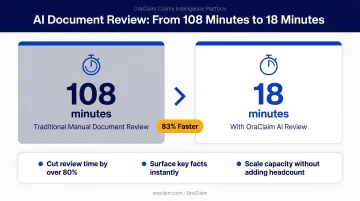
For insurance defense teams specifically, this step is where the time compression becomes most visible. A 2022 PubMed-indexed study found that an OCR/NLP workflow reduced medical record abstraction time from 108 minutes to 18 minutes with less than 1% incorrect results. OraClaim's medical chronology module similarly reduces what traditionally takes 15–60+ hours per file to under 60 minutes for a first draft.
Defense-critical extractions include pre-existing conditions, prior accidents, missed appointments, causation gaps, ICD-10 and CPT code pulls, and billed-versus-paid analysis. Generic tools regularly miss or misclassify these categories — which is precisely where the defense exposure lives.
Step 4: Review AI Outputs and Feed Intelligence Back Into Case Strategy
AI handles volume. Attorneys apply judgment to the output.
Every OraClaim output is a first draft: ready-to-edit work product that the attorney finalizes. Nothing reaches a client or court as a direct AI output without attorney review.
Teams that close the feedback loop improve over time. Corrections and outcome tracking build a structured repository of past case intelligence — plaintiff counsel history, jurisdiction patterns, expert witness reliability, verdict and settlement ranges — that informs strategy on future matters. Over time, that repository stops being a record of past work and starts functioning as a competitive advantage on the next file.
When Is AI Document Management the Right Fit?
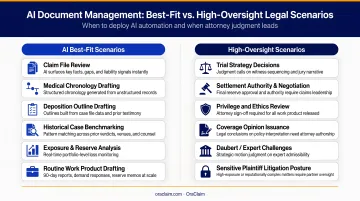
AI document management delivers the clearest ROI when document volumes are high and review timelines are tight. Low-volume matters where manual review is already efficient don't benefit much.
Best-fit scenarios:
- Litigation discovery with large document productions
- Insurance defense involving voluminous medical and billing records
- Due diligence reviews with recurring document structures
- Compliance audits with standardized, high-frequency document sets
- Workers' compensation and personal injury matters with complex medical histories
Scenarios requiring more oversight:
- Highly nuanced legal arguments demanding contextual reasoning throughout
- Documents in non-standard formats or non-English languages
- Privilege review determinations requiring granular human judgment at every step
The scale of that adoption reflects where the pressure is greatest. The NAIC found that 84% of surveyed health insurers now use AI/ML in their operations, with over 50% applying it to claims fraud detection and medical provider fraud detection. For defense teams handling the downstream litigation — claim file review, medical record analysis, exposure assessment — that same volume pressure makes AI a practical necessity, not a novelty.
What Legal Teams Need Before Implementing AI Document Management
Teams that deploy AI without a clear plan find outputs are noisy, errors are hard to catch, and adoption stalls. The three readiness areas below determine whether implementation succeeds or struggles.
System and Integration Requirements
The platform must connect to the team's existing document repository — cloud-based or on-premises — without requiring a full system overhaul. Verify integration capabilities before committing to any platform. OraClaim, for instance, integrates with Clio, MyCase, Smokeball, PracticePanther, NetDocuments, iManage, Worldox, and Box upon customer request.
Data Quality and Document Readiness
AI performance degrades when input documents are poorly scanned, inconsistently named, or stored without metadata. For insurance defense teams, this typically means claim files, medical records, and correspondence that have accumulated across multiple systems. Before deployment, assess whether documents need to be:
- Converted to machine-readable formats (OCR processing for scanned files)
- Standardized in naming conventions
- Cleaned of duplicate or partial records
- Organized with basic metadata for routing
Governance, Security, and Compliance Readiness
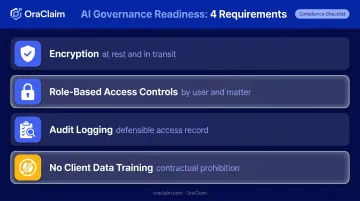
Legal documents contain privileged communications, sensitive client data, and confidential case information. Before deployment, confirm:
- Encryption at rest and in transit
- Role-based access controls limiting document access by user and matter
- Audit logging creating a defensible record of who accessed what and when
- No model training on client data — OraClaim contractually prohibits use of Confidential Information to train, fine-tune, or validate any AI models
Bar association guidance is now explicit on these obligations:
- ABA Formal Opinion 512 (2024) requires lawyers using generative AI to address competence, confidentiality, supervision, and accuracy obligations
- Florida Bar Opinion 24-1 requires reviewing AI data retention and self-learning policies before entering client information
- California COPRAC and NYC Bar Formal Opinion 2024-5 impose similar obligations
HIPAA note: If the platform processes protected health information — which applies to most insurance defense matters involving medical records — verify business associate agreement compliance before onboarding.
Key AI Capabilities That Determine Results
Not all AI document management tools produce equivalent outcomes. These four capabilities separate platforms that genuinely reduce attorney workload from those that add another interface to manage.
Automated Document Classification and Prioritization
Without classification, document review is random and slow. AI that categorizes documents by type, relevance, and urgency lets teams focus on the highest-priority items first rather than working through documents sequentially. This is particularly valuable when triaging large discovery productions where critical documents can be buried in thousands of routine files.
Intelligent Extraction of Key Facts and Clauses
AI that extracts specific data points — dates, diagnoses, billing codes, treatment gaps, liability facts, parties, obligations — eliminates the need for attorneys to read every page in full. Extraction accuracy directly affects downstream strategy.
Tools purpose-built for defense workflows surface litigation-critical facts that generic tools miss:
- Pre-existing conditions and causation gaps
- Inconsistencies between subjective complaints and objective findings
- Prior accidents, missed appointments, and treatment gaps
- ICD-10/CPT code anomalies
OraClaim's extraction layer is configured specifically for this workflow. Each extracted fact includes a pin-citation to the underlying record page for verification and impeachment use.
Pattern Recognition Across Past Cases
Benchmarking current documents against historical closed files surfaces patterns that inform strategy before depositions or mediation:
- Comparable settlement and verdict ranges by fact pattern
- Plaintiff-counsel-specific outcome histories
- Judge-specific motion-grant rates by jurisdiction
- Expert witness reliability patterns across prior matters
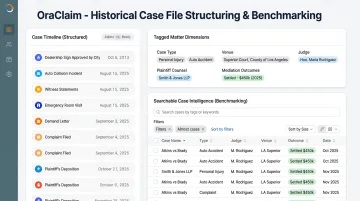
OraClaim's Historical Case File Structuring and Benchmarking module ingests years of unstructured PDFs, scanned files, and practice management exports, then auto-tags each matter across dozens of dimensions — case type, venue, judge, plaintiff counsel, reserve history, and mediation outcomes. This turns institutional knowledge into a searchable asset rather than letting it walk out the door when attorneys leave.
Integration With Existing Workflows
AI tools that require attorneys to log into a separate system, manually upload files, or re-enter case information face adoption resistance. Wolters Kluwer's 2024 Future Ready Lawyer Report found that 76% of legal departments and 68% of law firms now use generative AI at least once per week — and sustained adoption consistently depends on tools that integrate with how attorneys already work, not tools that demand a parallel workflow.
Common Mistakes Legal Teams Make With AI for Document Management
These errors consistently derail AI implementations:
- Skipping the audit phase — deploying AI without identifying which workflows are most broken means it gets applied to low-impact tasks while the most time-consuming problems stay manual
- Choosing non-specialized tools: Generic models aren't calibrated for legal document types, so outputs require heavy attorney correction — which negates time savings and erodes confidence in the technology
- Treating AI outputs as final without attorney oversight — this is a professional responsibility issue, not just a quality concern; in Mata v. Avianca, lawyers were sanctioned $5,000 after submitting fictitious AI-generated citations without verification
- Not building a feedback loop: Teams that skip correction and retraining see accuracy plateau quickly. Teams that close the feedback loop build a defensible record of AI use and continuously improve over time.
Bar association ethics opinions across ABA, Florida, California, and New York all converge on the same point: AI outputs must be reviewed and verified by the responsible attorney before use in legal work. In practice, that means building review checkpoints into the workflow — not treating verification as a final rubber stamp after the work product is already drafted.
Conclusion
AI for legal document management works best when it's applied to the right workflows, configured for legal-specific document types, and supported by clear governance and attorney oversight. The technology amplifies attorney capability — it doesn't replace professional judgment.
Defense teams and claims professionals who deploy AI with discipline gain a measurable edge over those still relying on manual review. That means starting with high-volume pain points, integrating with existing systems, maintaining attorney review of all outputs, and closing the feedback loop on every case.
Platforms like OraClaim are built specifically for this workflow — giving defense attorneys and claims professionals the structure to move faster without sacrificing accuracy or privilege protections. The document burden keeps growing. The teams that manage it systematically are the ones that stay ahead.
Frequently Asked Questions
How can legal teams use AI for document management?
Legal teams use AI to automatically classify, extract key facts from, and prioritize documents — reducing the time attorneys spend on manual review. AI surfaces critical information faster across large document sets, replacing non-billable groundwork while attorneys focus on strategy and final work product.
Is it legal to use AI to write legal documents?
Using AI to assist in drafting legal documents is generally permissible, but attorneys retain full professional responsibility for the final work product. Bar guidance is evolving: ABA Formal Opinion 512 and multiple state bar opinions require competence, confidentiality protection, and attorney verification of AI outputs before use.
What types of legal documents benefit most from AI management?
High-volume document types see the greatest benefit: discovery productions, medical records in claims, deposition transcripts, contracts, and compliance records. Insurance defense matters involving voluminous medical and billing files are a particularly strong use case, where AI can extract treatment timelines, billing codes, and causation gaps across hundreds of pages quickly.
How does AI protect client confidentiality during document review?
Reputable legal AI platforms implement encryption at rest and in transit, role-based access controls, and audit logging. Confirm the platform does not train on client data: OraClaim contractually prohibits using Confidential Information to train any AI model. Review bar guidance on data retention and self-learning policies before entering client information into any tool.
Can AI document management replace attorney judgment?
No. AI handles volume and pattern recognition — classification, extraction, flagging — but attorney judgment remains essential for privilege determinations, strategic decisions, and final work product. AI is a force multiplier; professional responsibility for the work product stays with the attorney.